Track: Pipeline, Tracker, follow-ups
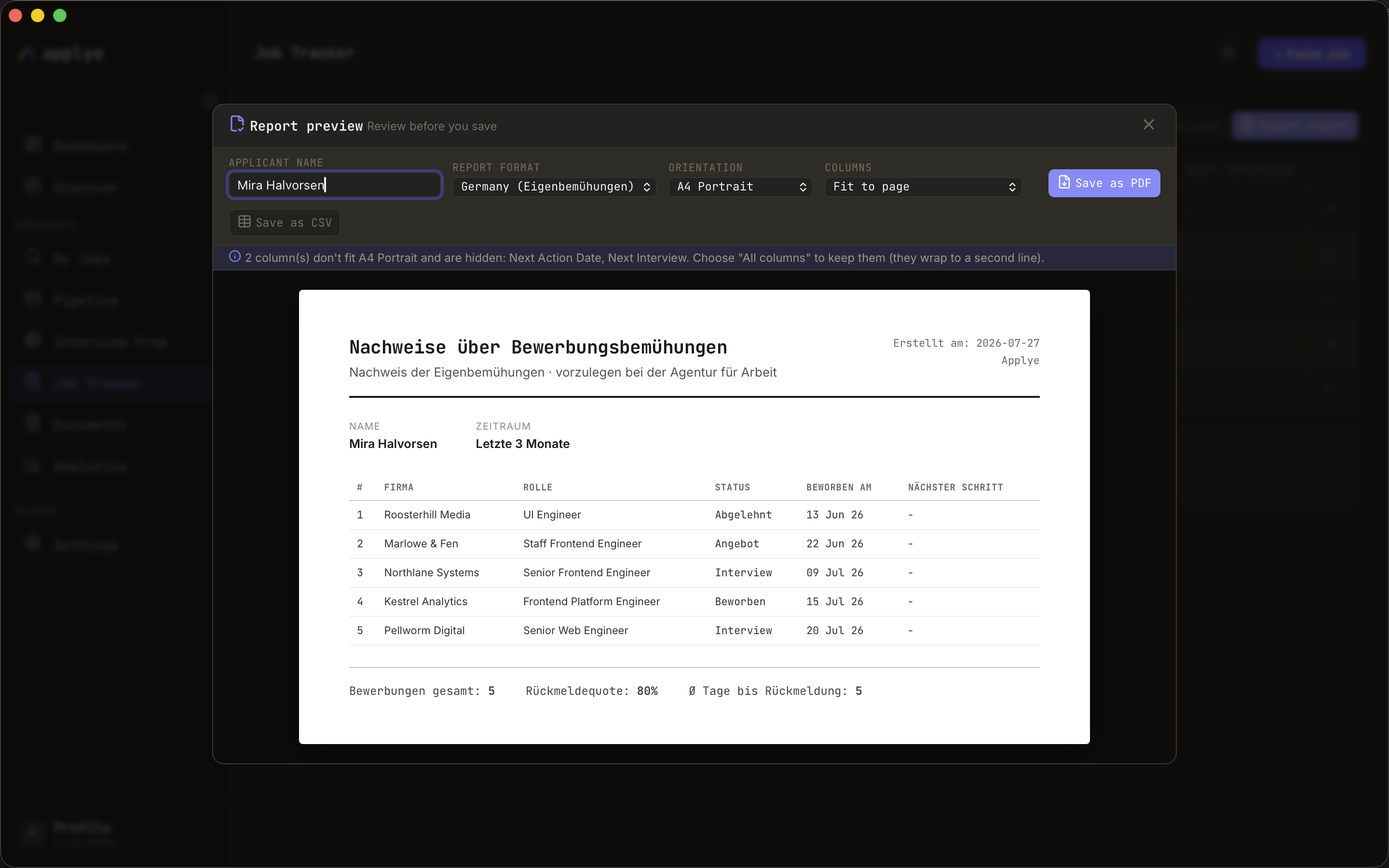
Two views of the same truth: the Pipeline kanban for what is moving, the Job Tracker table for the full record - including the report you may need for the Agentur für Arbeit.
Pipeline (kanban)
- Active applications move across applied / interview / offer by drag and drop; every status change is dated automatically.
- Rejected and cancelled collapse into side rails so the board stays about what is alive; expand them any time.
- A summary strip shows active count, overdue count, and a search box.
- Click a card for the quick view: status, match score, the interview stage stepper, and - when an application is overdue - a follow-up draft you can copy. Applye never sends mail.
Job Tracker (table)
- Six essential columns by default; the other fourteen plus your own custom columns live in the Columns drawer.
- Rows are read-only until you hit Edit - then the row itself becomes the form.
- Archive keeps old applications out of the active view but inside the report.
The exportable report
- Click Export report - a preview opens first, always.
- Pick the format: Germany (the official Eigenbemühungen document, in German, with letterhead) or International (English).
- Pick A4 portrait or landscape, and whether extra columns are cut to fit or wrapped.
- Save as PDF (exactly what the preview shows) or Save as CSV, via the native save dialog.